
An event promo code works when it has a clear purpose, a defined audience and a limit. Decide who the code is for, what it takes off, when it expires and how many times it can be used. Then give it a name you can read in a report later. Do those five things and a code becomes a controlled way to fill seats, reward partners and see which channels bring registrations.
This guide covers how organizers set up event discount codes, where to send them, how to test and shut them off, and how to measure the result. It is written for planners who run paid registration: conferences, association meetings, workshops, trade shows and career fairs.
TL;DR
- Use a promo code when you need to control who gets a discount. Use an automatic discount when the rule is simple and public, such as group size.
- Name codes by purpose (for example COMP, CSPK, CSPN, CEXH), so reports are readable and complimentary registrations drop to $0 at checkout.
- Set an audience, an amount, an end date and a use limit before you publish any code.
- Test every code as a real registrant, then check usage on a schedule during the registration window.
- rsvpBOOK prices per registration, offers discounted rates for nonprofits and government, and gives hands-on implementation support when you want help with setup.
Table of Contents
- What an event promo code is, and how it differs from other discounts
- Types of event registration discounts worth offering
- How to set up an event discount code
- How to distribute promo codes to the right audience
- Where attendees find event promo codes
- Managing, testing and deactivating discounts during registration
- Tracking whether promo codes work
- Promo codes at trade shows and career fairs
- Onsite: keep the promise you made at registration
- Planning your codes: a short checklist
- Why planners choose rsvpBOOK for event discounts
- Perspective
- FAQ
- Sources
What an event promo code is, and how it differs from other discounts
An event promo code is a short text string a registrant types at checkout to reduce or remove the registration fee. The organizer decides who receives it, so the discount reaches only the people you chose.
That control is the main difference from other discount methods. The National Eye Institute’s event registration training guide describes two common approaches. With a promo code, only people who were sent the code can use it, which suits speakers, sponsors and exhibitors. With a custom question that applies a discount automatically (“Are you a member?”), anyone can click “Yes,” so the guide recommends regular audits by the people managing the program.
The tradeoff is effort. The same guide notes that fixed-dollar code discounts can require several codes across registration tiers and membership types. Custom questions are easier to set up but easier to misuse.
Here is how the main discount methods compare:
| Method | Who can use it | Best for | Watch for |
|---|---|---|---|
| Promo code | Only people you send it to | Speakers, sponsors, exhibitors, partners, campaigns | More codes to manage across tiers |
| Custom question that applies a discount | Anyone who answers “Yes” | Simple, low-risk member or student discounts | Needs regular audits |
| Registrant-type pricing | Anyone who picks that type | Members, non-members, students, staff | Type must be clearly defined |
| Group discount | Companies that register enough people | Teams and delegations | Set a minimum and the tiers |
| Early-bird pricing | Anyone, until a date | Building early momentum | Plan what happens on the cutoff date |
Most events use a mix. Codes handle the cases where you want control, and the public rules handle everything else.
Types of event registration discounts worth offering
Before you create a single code, decide which problem it solves. Each of these has a different audience and a different risk.
Complimentary codes for speakers, sponsors and exhibitors
This is the most useful kind of code for B2B events. Sponsor packages often include a set number of free registrations, and a code makes sure each one is used by someone you approved.
The NEI guide uses a standard set of prefixes: COMP for a complimentary attendee, CSPK for a complimentary speaker, CSPN for a complimentary sponsor and CEXH for a complimentary exhibitor. The registration fee adjusts to $0 at checkout, and the code tells you at a glance who the person is when you open a report.
Percentage or fixed-amount codes for campaigns
A percentage code (20% off) is easy to understand and scales with ticket price. A fixed-dollar code ($50 off) is easier to budget. If you have several registration tiers, a percentage code usually saves you from building one code per tier.
Member and partner codes
Associations often give members a lower price and share a code with partner organizations or chapters. Sending a unique code to each partner shows you which partner actually brought registrants.
Group discounts
The more people a company registers, the lower the per-person price. NEI added a group registration discount in early 2025 that applies automatically once a minimum is met, with no code needed. That is a good model when the rule is public and the reward is for volume. rsvpBOOK supports group registration, including group and table registration, for events where companies register teams.
Early-bird and last-chance offers
These are date-based prices. A code can sit on top of them, for example a “final week” code sent only to people who opened your emails but did not register.
How to set up an event discount code
The steps are the same in any registration system. What changes is how much time they take and how many places you have to repeat the work.
- Define the goal. Fill seats, reward sponsors, drive early sales or recruit a specific audience. One code, one goal.
- Choose the audience. Name the group in writing: speakers, a partner association, past attendees, students.
- Set the amount. Percentage or fixed dollars. Check that the lowest ticket price minus the discount still covers your per-attendee costs.
- Set the dates. A start and an end that match your registration windows. A code with no end date tends to circulate long after you meant it to.
- Set the limits. Total uses, and one use per person where possible. Complimentary codes should be tied to the number of seats in the sponsor package.
- Decide which registrant types and sessions it applies to. If workshops or add-ons cost extra, state whether the code covers them.
- Name it by purpose. Use a prefix system like the one above plus a short tag, such as CSPN-ACME. Avoid names that look the same when read quickly.
- Write it down. Keep one sheet that lists each code, owner, audience, amount, dates and limit.
That last step is dull and it saves the most time. When a sponsor writes in asking why their code failed, the sheet gives you the answer in seconds.
Where rsvpBOOK helps with setup
rsvpBOOK builds branded registration websites with custom questions, registrant types, group and table registration and discounts, all in one event record. Payments sit in the same record through event payment management, so a discounted registration, its payment and its report line stay connected. If you would rather not build it alone, rsvpBOOK offers hands-on implementation support, and an AI-assisted builder can turn an event design document into a working setup.
How to distribute promo codes to the right audience
A code is only as good as the channel that carries it. Match the channel to the audience, and keep public channels for public offers.
- Speakers, sponsors and exhibitors: send each code directly in the confirmation or welcome email, with the instructions to register. One code per sponsor package makes it easy to see who has registered and who has not.
- Members: use your member newsletter or portal. If the discount is for members only, a code limits it to people who received the message.
- Past attendees: a targeted email, sent before general registration opens, rewards loyalty and fills seats early.
- Partner organizations: give each partner its own code. Do not share one code across partners, or you cannot tell who delivered what.
- Campaign audiences: a code in a social post or ad lets you compare that channel to others.
- Career fairs and campus events: a code for student or alumni lists, or for recruiting teams that register several representatives.
Planning that many sends adds up. If you are choosing tools to keep the tasks organized, this comparison of project management tools for event planners can help you decide how to track code owners, deadlines and follow-ups.
Avoid posting a limited code on public coupon sites. Once it is out there, you lose control of who uses it and for how long.
Where attendees find event promo codes
Attendees who search for a code usually find them in a few places: the organizer’s email, a sponsor or partner announcement, a member portal, a speaker invitation or social posts from the event. If you want a discount to reach someone, put it where they will already be looking, and say plainly who it is for.
If you are an attendee looking for a code, the most reliable place is the organizer’s own communication. Ask the organizer, check your membership benefits, or look at the event’s registration page for any stated offers. Codes from third-party listings are often expired or limited to a different audience.
Managing, testing and deactivating discounts during registration
The work does not stop when the code goes live. A short routine keeps discounts accurate.
Test before you publish
Run a test registration for every code, as a registrant would. Check that:
- the discount applies to the right registrant types and nothing else,
- the total at checkout is the number you expect,
- complimentary codes drop to $0 and skip the payment step cleanly,
- an expired or over-limit code shows a clear message,
- the confirmation email and the record in your reports show the code used.
Repeat the test after any change to prices or registrant types, because changes to one can affect the other.
Audit on a schedule
Pull a usage report once a week while registration is open, and daily in the last week. Look for:
- codes used more often than the sponsor package allows,
- unusual spikes from one code,
- complimentary codes used by someone you do not recognize,
- people who answered a discount question “Yes” but do not fit the group.
The NEI guide recommends weekly audits for custom-question discounts, and the same habit works for codes. rsvpBOOK offers custom reports and automated alerts, so you can review registrations by type and by what was discounted without exporting everything into a spreadsheet first.
Change or retire a code
If a code leaks, end it and issue a replacement to the intended audience. If you change the amount, tell the people who already have the code. When registration closes, deactivate every code, and note any leftovers in your sheet for next year.
Tracking whether promo codes work
A code is a small experiment. To learn from it, decide in advance what you will compare.
| Question | What to look at |
|---|---|
| Did the code bring in new registrations? | Registrations using the code, compared with the same period at a previous event |
| Which channel works? | Registrations per code, when each code went to a different channel |
| Did the discount cost too much? | Revenue per registration after the discount |
| Did sponsors use their seats? | Complimentary codes sent versus redeemed |
| Did the right people register? | Registrant type, company and session choices for code users |
Give each channel its own code, and you will see it in the report. If you send the same code to three places, you learn nothing about any of them.
Also watch what happens after registration. Do code users attend? Do they join sessions? Do they come back next year? A cheap registration that never shows up is not a win, and a discount that brings in repeat attendees may be worth more than it looks.
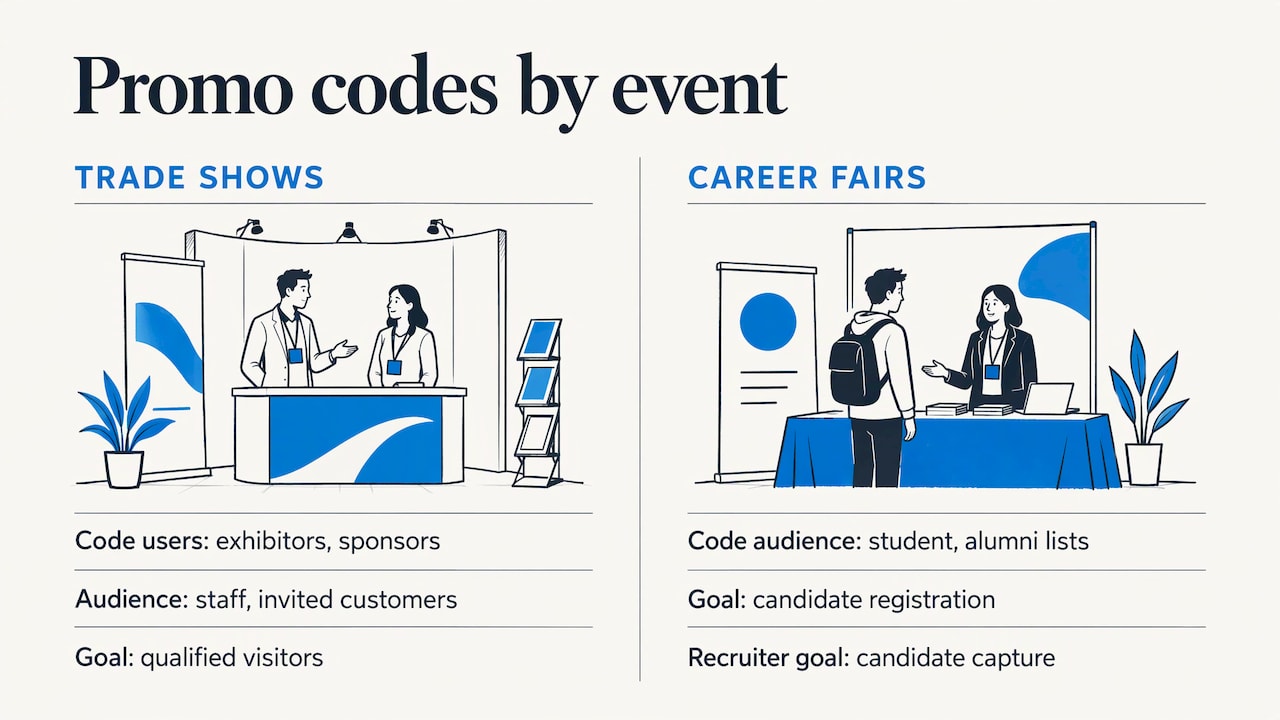
Promo codes at trade shows and career fairs
Trade shows and career fairs use discounts and incentives in a slightly different way.
For trade shows, codes go to exhibitors and sponsors for their own staff and invited customers. That fills the hall with qualified visitors and gives exhibitors a way to invite their best prospects. Once visitors are on the floor, lead retrieval lets exhibitors capture their booth conversations as usable leads, and booth giveaways such as an Instant Prize Wheel or a live Winner Drawing turn booth visits into qualified leads. Standalone booth giveaway tools from rsvpBOOK start at $99 per event.
For career fairs, the goal is candidate capture and booth traffic for recruiters. A code for student and alumni lists gets candidates registered, and the same giveaway tools give recruiting teams a reason for candidates to stop at the booth and share their details.
Onsite: keep the promise you made at registration
The discount is only half the experience. People who registered with a code should walk in and be checked in quickly. rsvpBOOK runs QR check-in, which is free on any smartphone, plus Kiosk+ self check-in and custom name badges. Badge printing and check-in kiosk hardware are optional add-on rentals. One customer moved more than 2,600 attendees through check-in with QR scanning.
Planning your codes: a short checklist
- One goal for each code.
- A named audience, written down.
- Amount that still covers your per-attendee costs.
- Start date, end date and use limit.
- A purpose-based name.
- Test registration completed for each code.
- Weekly usage review while registration is open.
- A plan to deactivate every code at close.
Why planners choose rsvpBOOK for event discounts
rsvpBOOK has supported event organizers since 2004. It connects registration, payments, sessions, onsite operations, exhibitor programs, engagement and reporting in one record, so discounts do not live in a separate spreadsheet. It is a flexible alternative to enterprise event platforms, with self-service setup or hands-on implementation support, depending on how complex your event is.
Pricing is per registration, and nonprofits and government organizations get discounted rates. Nonprofit teams can see how it fits on the nonprofit event registration page. To see how it works for your event, start with event registration software.
Perspective
Since 2004, the questions we hear about discounts have barely changed: who gets it, how do we stop it from spreading, and how do we know it worked?
Our view is that the discount should live in the same record as the registrant. When the code, the registrant type, the payment, the session choices and the report all sit together, the audit is a report, not a detective project.
We also think planners should not have to buy the biggest platform to get flexible rules. Complex events need adapted workflows, and a small team needs to be able to set them up without weeks of training. That is why we offer self-service setup and hands-on implementation support, and per-registration pricing that scales with the event.
Start with the audience, keep the rules few, and let the data tell you what to repeat.
Droshawn
FAQ
What is the difference between event promo codes and event discount codes?
In practice, they are the same thing. Both are codes a registrant enters to lower a registration fee. The useful difference is between codes, which only approved people receive, and automatic discounts that anyone can trigger by choosing an option.
How many promo codes should an event have?
As few as your audiences need. Give each distinct audience or channel its own code, such as speakers, each sponsor tier, each partner and one campaign code. More than that gets hard to audit, and fewer than that hides what is working.
Should I use a promo code or a custom question for a member discount?
Use a code if only a defined list should get the discount and you want control. Use a custom question or registrant type if the rule is simple and public. The NEI guide notes that custom questions need regular audits because anyone can answer “Yes.”
How do I manage discounts for sponsors and exhibitors?
Issue one complimentary code per approved person, using a clear prefix for speaker, sponsor or exhibitor. Match the number of codes to the seats in each package, and compare sent codes with redeemed codes in your registration report.
Does rsvpBOOK offer discounted pricing for nonprofits?
Yes. rsvpBOOK pricing is per registration, and nonprofit and government organizations receive discounted rates. Hands-on implementation support is available when your event needs it.
Sources
- Discount/Promo Codes, NEI Event Registration Training Guide
- 7 Best Project Management Tools for Event Planners
Ready to see it with your own event? Book a demo or start building an event free.
Recommended
- Event Promotion: A Practical Plan to Fill Your Event
- Event Marketing Strategies That Fill Seats and Capture Leads
- Online Event Registration: 7 Tools for a Better Attendee Experience
Planning an event that doesn’t fit neatly into somebody else’s template? See how rsvpBOOK handles registration, onsite check-in, lead retrieval and engagement in one platform. Book a demo: https://www.rsvpbook.com/book-a-demo
