The best event registration software for a nonprofit keeps total cost predictable, sets up quickly and handles the real event: group and table registration, custom questions and fast check-in. rsvpBOOK is a strong fit, with per-registration pricing, discounted rates for nonprofits and government, free QR code check-in on any smartphone and hands-on setup support when you need it.
If you are looking for an Eventbrite alternative that does more than ticketing, look for software that covers the full event: registration, payments, sessions, check-in and reporting in one record. Simple ticketing tools stop at the sale. An event management platform like rsvpBOOK keeps going until the last guest is checked in and the report is run.
TL;DR
- Compare nonprofit options on five things: total cost, pricing model (per registration or annual contract), ease of setup, group registration and check-in.
- Per-registration pricing lets cost follow attendance, which suits events that vary in size from year to year.
- rsvpBOOK has supported event organizers since 2004 and offers discounted rates for nonprofits and government organizations.
- Free QR code check-in works on any smartphone. Badge printing and check-in kiosk hardware are optional add-on rentals.
- Choose by event type: a simple ticket sale needs less than a gala with tables, sponsors, workshops and volunteers.
Table of Contents
- What nonprofits should compare
- The main types of options
- Where rsvpBOOK fits for nonprofits
- Comparing options by event type
- Questions to ask any vendor
- Keep your guests informed after they register
- Our view: why the whole event belongs in one record
- See it built for your event
- FAQ
- Sources
What nonprofits should compare
Most nonprofit events run on small teams, volunteer help and tight budgets. That changes what “best” means. A feature list matters less than how the tool behaves in the weeks before your event and on the day itself.
Use these five criteria to compare any option.
Total cost, not the headline price
Look past the first number. Ask what you pay per registration, whether payment processing is billed separately, and what extras cost: SMS reminders, badge printing, check-in equipment, lead capture for sponsors. Then estimate a full year of events, not just one.
An event with 150 guests and one with 1,500 should not cost the same to run. A pricing model that scales with attendance protects a small team from paying for capacity it never uses.
Per-registration or annual contract
There are two common models. Per-registration pricing charges as people sign up. Annual contracts charge a fixed amount for a term, often with limits on events or users.
Annual contracts can work for organizations that run events every week. Many nonprofits run a handful per year: a spring gala, a conference, a volunteer day, a few workshops. For them, paying per registration keeps spending tied to events that actually happen. rsvpBOOK pricing is per registration.
Ease of setup
A volunteer coordinator should be able to build a registration page without a training course. Check whether you can set up on your own, and whether someone will help when an event gets complicated. A tool that is simple for a ticket sale but needs a workaround for table seating will cost you hours later.
Group and table registration
Galas, luncheons and fundraisers are often sold by the table. Corporate sponsors buy ten seats and then need to assign guests. Churches, schools and chapters register families or teams. If your software only sells single tickets, someone ends up tracking groups in a spreadsheet.
Check-in
Check-in is where weak setups show. Look for scanning that works on phones your volunteers already own, a way to search for names when someone forgot their code, and a clear view of who has arrived. Printed badges and self-service kiosks are nice for larger events, but should be optional.
The main types of options
There is no single product name that fits every nonprofit. The market sorts into a few types, and each suits a different event.
| Type of option | Best for | Strengths | What to check |
|---|---|---|---|
| Free fundraising-first platforms | Small galas and donation-led events | Low upfront cost, donation tools built in | Fit for multi-session or complex events, reporting depth |
| Public ticketing marketplaces | Open events that need public discovery | Quick listing, familiar to attendees | Group and table handling, custom questions, depth beyond the sale |
| Enterprise event platforms | Large organizations with dedicated event staff | Wide feature range | Annual contract terms, setup time, cost for a small team |
| CRM add-ons and open-source tools | Teams with technical staff or an existing donor database | Tight link to donor records | Maintenance load, who builds and supports it |
| All-in-one event management software | Nonprofits running varied events with registration, check-in and reporting | One record from signup to report | Pricing model, setup help, optional hardware |
rsvpBOOK sits in the last row. It is built for organizers who want flexible configuration for complex events without the complexity of an enterprise platform.
Free fundraising-first platforms
These suit organizations whose main goal is collecting donations at a simple event. They are attractive when budgets are very small. The question to ask is what happens when the event grows: you add sessions, sponsor tables, dietary questions or a second check-in line. Confirm the tool can follow.
Public ticketing marketplaces
These are good at one thing: selling tickets to the public. If your event is open to anyone and discovery matters, that can be enough. When you need registrant types, table registration, workshop assignments or a full attendee record, you need software that does more than ticketing. That is the gap rsvpBOOK is designed to fill.
Enterprise event platforms
Large platforms offer a long feature list and can work well for organizations with a full events department. A nonprofit with two staff members and a volunteer committee often wants something more direct: build the site, collect registrations, run check-in, pull the report. rsvpBOOK positions itself as a flexible alternative to enterprise event platforms, with self-service setup or hands-on support, and per-registration pricing.
CRM add-ons and open-source tools
If you have a developer on the team or volunteer, a CRM-based approach can keep donor and event data together. It also means someone maintains it. For organizations without that capacity, a hosted, cloud-based tool means one less system to look after.
Where rsvpBOOK fits for nonprofits
rsvpBOOK is event management and registration software that connects registration, payments, sessions, onsite operations and reporting in one record. The company has supported event organizers since 2004. Its event registration software for nonprofits is built around the things nonprofit teams ask about most.
Pricing that follows attendance
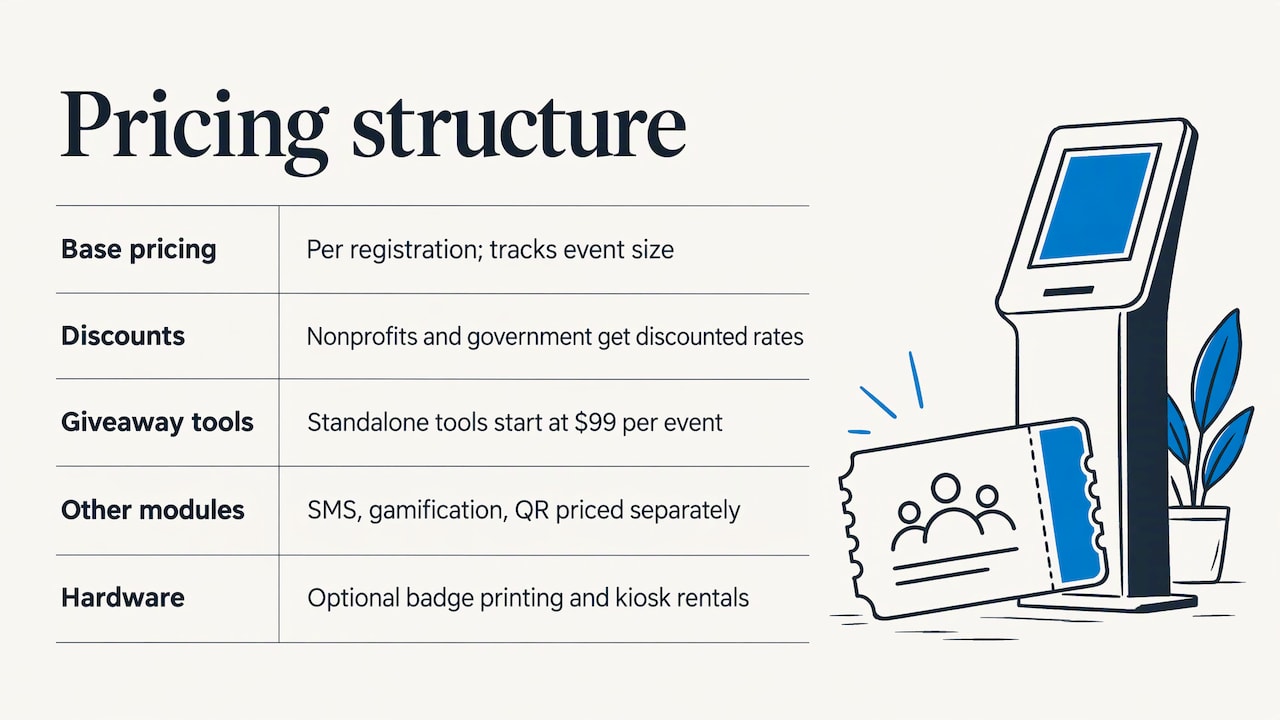
rsvpBOOK pricing is per registration, so your cost tracks the size of each event. Nonprofit and government organizations get discounted rates. For standalone booth giveaway tools, such as an Instant Prize Wheel or a live Winner Drawing for sponsor and exhibitor booths, pricing starts at $99 per event. Other modules, like SMS messaging, gamification and QR code management, are priced as additional modules.
Badge printing and check-in kiosk hardware are optional add-on rentals. You rent them only for the events that need them. Hardware, onsite staff and support are not part of any price, so confirm what you need when you plan your event.
A registration site you control
Organizers build branded registration websites with their own look and wording. The registration website tools support custom registrant types, so members, donors, volunteers and guests can each follow their own path. Registration forms accept custom questions: meal choices, accessibility needs, T-shirt sizes, how someone heard about the event.
There is also an AI-assisted builder that turns an event design document into a working setup. If you already have the plan written down, that can shorten the first build.
Group and table registration
For galas and luncheons, group registration lets one person register a table or a team. Discounts can be applied, and attendees can be assigned afterward. That removes the spreadsheet handoff between the buyer and the event team.
Payments and ticketing
Registration and payment sit together. Details are on the event payment management page, and ticket options are covered under event ticketing. Because payments live in the same record as the registrant, finance and event teams read from the same data.
Free QR code check-in
QR code check-in is free on any smartphone, so volunteers can scan guests in with devices they already carry. See how QR code event check-in works. For larger events, Kiosk+ self check-in and custom name badges are available, with kiosk and printing hardware offered as optional rentals.
One rsvpBOOK customer moved more than 2,600 attendees through check-in with QR scanning. For workshops and sessions, attendance tracking shows who actually showed up.
Sessions, workshops and CE credits
Training days, conferences and member meetings often include breakouts. rsvpBOOK handles sessions and workshops, including CE credits, so attendees pick their sessions at registration and you see the room counts ahead of time.
Hands-on implementation support
rsvpBOOK offers hands-on implementation support when an event needs it. Some teams build alone. Others want help configuring a complicated registration path before launch. Both options exist, and you can decide event by event.
Comparing options by event type
The right choice depends on what you are running. These examples show how the criteria apply.
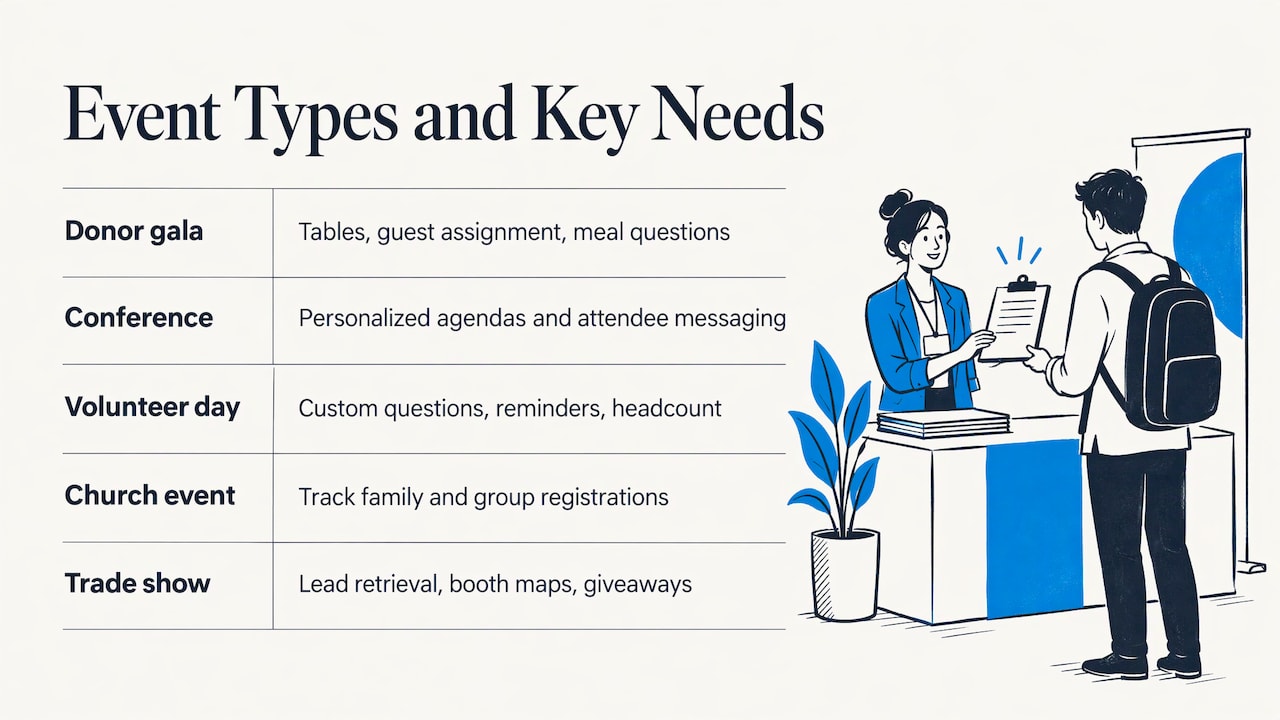
A donor gala with sponsor tables. You need table sales, guest assignment, custom meal questions, payment tracking and quick check-in. Group registration and a connected attendee record matter most. If sponsors want visibility, booth or table giveaways can add a live moment.
A one-day conference or member meeting. Add sessions, registrant types and a printed or mobile agenda. rsvpBOOK’s attendee mobile app offers personalized agendas and messaging, which reduces the questions your staff answers on the day.
A volunteer day or walk. Registration can be simple. The value is in custom questions, reminders and a reliable headcount. SMS reminders are available as an additional module.
A church or faith community event. Families register, and groups need to be tracked. See the church event registration tools for a setup built around that kind of event.
A trade-show style fundraiser or career fair. Exhibitors and sponsors want leads. rsvpBOOK offers exhibitor and organizer lead retrieval, interactive booth maps and booth giveaways. For career fairs, recruiters use the Instant Prize Wheel or Winner Drawing to draw booth traffic and capture candidates.
Questions to ask any vendor
Before you commit, run through this list.
- What do I pay per registration, and what is billed separately?
- Is there a nonprofit rate?
- Can I run an event without a long contract?
- Can one person register a group or table, and can I assign guests later?
- Can I add custom questions and different registrant types?
- Does check-in work on volunteers’ phones?
- Is printing or kiosk hardware optional, and how is it rented?
- Who helps me if the setup gets complicated?
- Can I export a report for my board and sponsors?
rsvpBOOK’s custom reports and automated alerts help with the last one: you can see registration progress and get alerts as numbers move.
Keep your guests informed after they register
A good registration page is only half the story. Confirmation, reminders and follow-up decide whether people show up and give again. Pair your event software with a solid email program. This comparison of email marketing platforms for nonprofits is a good starting point for choosing where your post-event messages are sent from.
Our view: why the whole event belongs in one record
Nonprofit teams are rarely short on ideas. They are short on hours. After watching organizers work since 2004, we see the same pattern: the event itself is manageable, but the pile of disconnected tools around it is not.
A ticket sale here, a spreadsheet of tables there, a separate app for check-in, another for sponsors. Each one is fine alone. Together they cost a volunteer coordinator their weekends.
That is why we build rsvpBOOK around one record. Registration, payments, sessions, check-in and reporting all read from the same data. When a guest changes a meal choice, the team on the door sees it.
We also think pricing should be easy to explain to a board. Per-registration pricing, with discounted rates for nonprofits and government, ties cost to the event. And when a design is complicated, hands-on implementation support means you do not have to figure it out alone.
Free QR code check-in on any smartphone means your volunteers can run the door without renting anything. If you want badges or a kiosk, those are optional add-on rentals.
Droshawn
See it built for your event
rsvpBOOK gives nonprofit teams a registration site, group and table sales, custom questions, QR check-in and reporting in one place, with discounted nonprofit rates and hands-on setup support available. Explore the event management software or review event registration to see how a build looks.
If your event includes sponsors or exhibitors, the booth giveaway tools start at $99 per event as a standalone purchase.
FAQ
What is the best event registration software for nonprofits?
The best choice is the one that fits your event and your budget model. For nonprofits that run varied events, rsvpBOOK offers per-registration pricing, discounted nonprofit rates, group and table registration, custom questions, free QR code check-in and hands-on setup support. Simple single-ticket events may need less, while multi-session galas and conferences need more.
Is per-registration pricing better than an annual contract?
It depends on how often you run events. If you hold a few events a year, or attendance changes a lot, per-registration pricing keeps cost tied to actual registrations. rsvpBOOK pricing is per registration, with discounted rates for nonprofits and government.
What is a good Eventbrite alternative for nonprofits that does more than ticketing?
Look for event management software that covers registration, payments, sessions, check-in and reporting in one record. rsvpBOOK does this, with group and table registration, custom registration questions, QR check-in, an attendee mobile app and custom reports. It also offers hands-on implementation support for complex builds.
Do I need to buy hardware for check-in?
No. QR code check-in is free on any smartphone. Badge printing and check-in kiosk hardware are optional add-on rentals, so you add them only when an event calls for it.
Can rsvpBOOK handle sponsors and exhibitors at a fundraiser?
Yes. rsvpBOOK offers lead retrieval, interactive booth maps and booth giveaways such as the Instant Prize Wheel or live Winner Drawing. Standalone booth giveaway tools start at $99 per event.
Ready to see it in action? Book a demo or start building an event free.
Sources
Recommended
- Event Registration Software for Nonprofits
- Event Registration Forms
- Group Registration Support
- Event Ticketing
Planning an event that doesn’t fit neatly into somebody else’s template? See how rsvpBOOK handles registration, onsite check-in, lead retrieval and engagement in one platform. Book a demo: https://www.rsvpbook.com/book-a-demo
