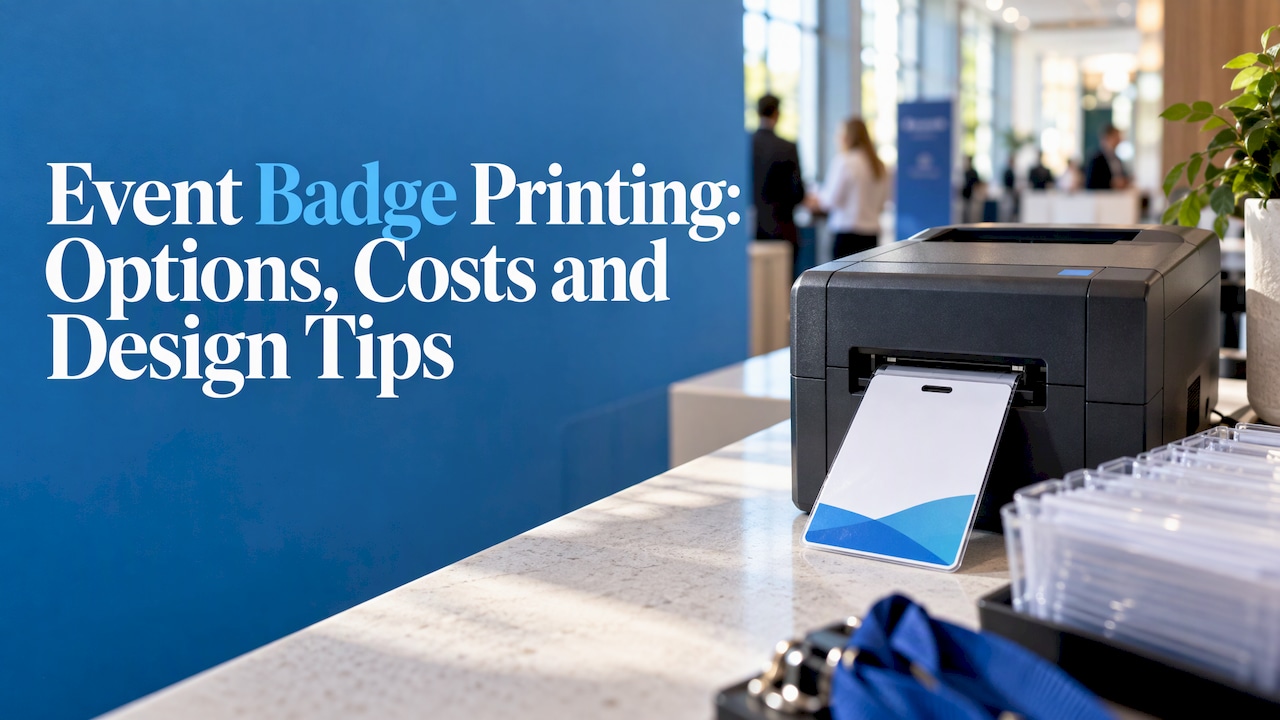
Event badge printing comes down to three choices: print everything before the event, print each badge at check-in, or do both. The right one depends on how settled your attendee list is and how many people arrive at once. Design, data and lane setup matter as much as the printer.
This guide is for busy planners. It covers the methods, the equipment, realistic costs, badge design, and the data work that keeps check-in moving. rsvpBOOK has supported event organizers since 2004, and the practical points below reflect that experience.
TL;DR
- Pre-print when your list is locked, print onsite when registrations change late, and use a hybrid for most conferences.
- A standard printer that accepts PDFs can produce badges. A thermal label printer is the usual choice for onsite printing.
- Make the first name the largest element, keep the logo small, and color-code attendee types.
- Clean attendee data, a tested design and a fallback plan matter more than the printer model.
- rsvpBOOK pricing is per registration, and badge printing and check-in kiosk hardware are optional add-on rentals.
Table of Contents
- Three ways to print event badges
- Equipment and supplies for onsite badges
- What event badge printing costs
- Designing a badge people can read
- Conference name badge ideas that do real work
- Prepare your attendee data first
- Set up the check-in lanes
- Our perspective on badge printing
- Print badges from the same system that runs registration
- FAQ
- Sources
Three ways to print event badges
Most events use one of three methods, as one badging guide lays out: pre-printed, onsite on demand, or hybrid.
Pre-printed badges
You print every badge before the event and sort them, often alphabetically, by organization or by attendee category. Guests pick theirs up on arrival. Print-vendor guidance notes the advantage is predictability. The tradeoff is less flexibility when attendee details change after the order.
This works well for a locked list, a small budget and a fixed program.
Onsite on-demand printing
The badge prints at the check-in station while the guest waits. The guest scans a confirmation, types a name at a kiosk or speaks to staff, and the system finds the record and prints. This suits large conferences, walk-ins, multi-day events and programs where data changes late.
Hybrid printing
You pre-print for confirmed guests and print on demand for everyone else. For many conferences this is the practical default: pre-print the stable majority, run normal collection lanes, and keep a separate exception station for walk-ins, corrections and replacements, a setup described in an onsite printing guide.
| Method | Best for | Main strength | Main limit |
|---|---|---|---|
| Pre-printed | Locked lists, tight budgets | Predictable, fast pickup | Late changes need reprints |
| Onsite on demand | Walk-ins, multi-day events | Always current data | Needs printers, stock and trained staff |
| Hybrid | Most conferences | Fast lanes plus flexibility | Two processes to manage |
Equipment and supplies for onsite badges
You do not need specialty gear to start. A print provider’s setup page says a consumer-grade printer that accepts PDFs can print badges. You need a desktop or laptop, badge paper stock or kits, and an internet connection. Set the printer to Actual Size or 100% scale, or the badge will shrink and the layout will shift.
A basic checklist:
- A laptop or tablet at each station
- One printer per station, plus a spare per entrance
- Badge stock, with extra for reprints
- Holders and lanyards
- A printed fallback list for outages
For events where speed matters, thermal label printers are common because they need no ink. rsvpBOOK supports custom name badges, QR check-in and Kiosk+ self check-in. Badge printing and check-in kiosk hardware are available as optional add-on rentals, so you can add them only when the event needs them. Read more about event name badges and the Kiosk+ self check-in tool.
What event badge printing costs
Costs split into stock, holders, printers, software and people. One event badging guide lists them roughly in that order. Stock is the biggest purchase and scales with headcount. Lanyards and holders are often quoted separately and forgotten. Printer rental is per unit, per event, and you need a spare.
Here is a sample of published figures.
| Approach | Typical cost | Notes |
|---|---|---|
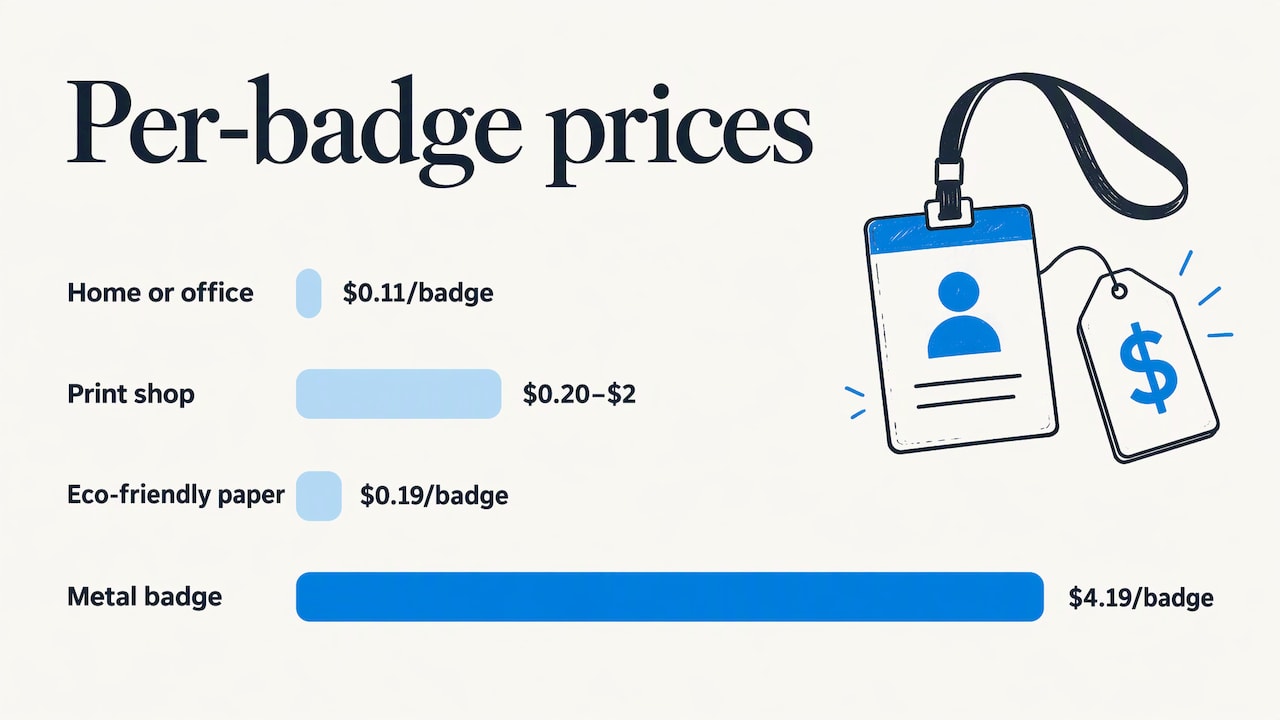
| Home or office printing | About $0.11 per badge plus holders | Inkjet or laser with perforated card stock inserts |
| Print shop | Roughly $0.20 to $2 per badge | One to five business days plus shipping |
| Onsite thermal printing | $240 to $1,400 for a printer, about $0.11 per badge in stock | Cost comparison from a badge cost breakdown |
That same breakdown, checked in October 2026, lists a label printer at $239.99, a direct thermal printer at $1,373 and 4×3 inch thermal badge stock at $54 for 500 pieces.
Print-shop pricing varies with material. One custom credential price list shows badges from $0.19 for eco-friendly paper up to $4.19 for metal, with a 100-piece minimum on most items. Standard production runs 5 to 7 business days, so order early.
Prices change, so confirm current numbers before you budget.
rsvpBOOK pricing is per registration. rsvpBOOK offers discounted rates for nonprofits and government organizations. Standalone booth giveaway tools start at $99 per event. Check the pricing page for what each module covers.
Designing a badge people can read
A badge has one job: help two people start a conversation. Design for that.
Build a clear hierarchy
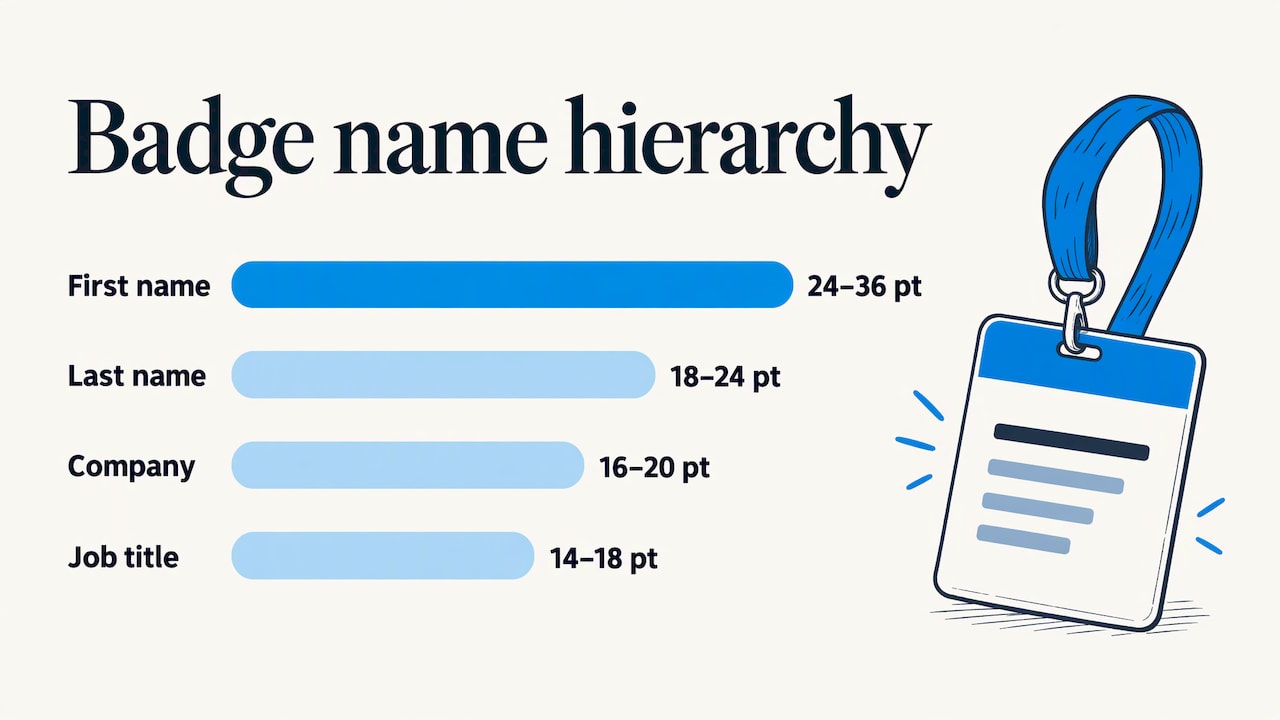
The order should mirror how people read each other: first name largest, last name second, company next, then extra details. One badge guide recommends a first name of 24 to 36 points in bold, high contrast and in the upper third of the badge. It suggests 18 to 24 points for last names, 16 to 20 for company and 14 to 18 for job title.
Another guide, from a print company, suggests 28 to 36 points bold for the first name. It also recommends a 4×3 inch size for networking events or 4×6 inches for multi-track summits. For print-ready files, it advises CMYK at 300 DPI with a 0.125 inch bleed.
The ranges overlap, so pick a size and test it.
Keep the logo in proportion
Attendees already know which event they are at. They do not know who is standing in front of them. The same print guide says the logo should take up roughly 15 to 20 percent of the badge area at most. Give the rest to names.
Test before you print thousands
Print a physical sample. Look at it from 10 to 15 feet away, in lighting like your venue’s. If you cannot read the first name, change the size or contrast. Cheap fix, early.
If you want a second view on briefing a designer or print producer, this guide to a design brief for custom awards covers the production details worth specifying up front, such as layout, readable text and color choices.
Conference name badge ideas that do real work
A badge can carry more than a name. Choose the extras that fit your program and keep them subordinate to the name.
- Role color bands. Color-code speakers, exhibitors, sponsors, VIPs and organizers. Staff can see at a glance who belongs where.
- Session or workshop indicators. Print short codes or icons for the sessions a guest registered for. This helps room monitors and supports CE tracking when you run sessions and workshops.
- Sponsor recognition. Add a small sponsor line or a ribbon to sponsor staff badges. Keep it small so names stay dominant.
- QR codes. A QR code can link to an attendee profile, a digital business card or a lead capture flow. rsvpBOOK includes QR check-in, free on any smartphone, and QR code management. See QR code solutions.
- Pronouns, languages or topics. Optional fields can spark conversation. Collect them on the registration form so they print correctly.
- Meal or access markers. A small icon for dietary needs or ticketed add-ons saves questions at the door.
Pick three or four of these. A crowded badge is harder to read than a plain one.
Prepare your attendee data first
Badge problems are usually data problems. Misspelled names, missing companies and inconsistent job titles show up in large type.
One onsite printing setup guide recommends building the data model about four weeks before the event. It suggests a single attendee table with fields for name, organization, job title, badge type, access level, QR token, registration status, check-in time, print time, print station and reprint count.
You do not need that exact list, but the idea holds:
- Keep one record per attendee.
- Standardize badge types before registration opens.
- Collect names exactly as people want them printed.
- Decide limits for long names and titles.
- Track who has been printed and who has checked in.
In rsvpBOOK, a custom registration form can collect these details with custom questions and registrant types, and the same record feeds check-in and reporting. Custom reports and automatic alerts help you watch registration counts as the event approaches.
Set up the check-in lanes
The printer matters less than how you arrange the lanes. Three setups cover most events, according to an event badging guide.
- Staffed desk. A person looks up the guest and prints. It suits under 300 guests or a high-touch welcome.
- Self-service kiosk. The guest scans or types, and the badge prints. It suits big arrival peaks where you need more lanes.
- Collection point. Pre-printed badges sit in trays. It suits a locked list and a tight budget.
Whichever you choose, bring one spare printer per entrance and enough stock for reprints. For more on how event teams think about staffing and flow at the door, this guide to event stage management offers useful context on running the schedule onsite.
A workable plan for a mid-sized conference:
- Pre-print badges for confirmed attendees and sort them by last name.
- Open collection lanes with QR scanning.
- Set up one exception station for walk-ins, name corrections and lost badges.
- Keep a paper list and spare stock at each entrance.
- Review check-in numbers hourly on day one.
For tracking arrivals and session attendance, see onsite check-in and attendance tracking.
Our perspective on badge printing
We see badge printing as part of check-in, not a separate task. When registration, payments, sessions and onsite operations sit in one record, a late change to a name or a session shows up on the badge without anyone re-keying data.
That is why we built rsvpBOOK around a single data record. Planners can set up registration, assign badge types, run QR check-in and report on attendance without moving files between systems.
We also know events differ. Some teams want to configure everything themselves. Others want a hand. Our setup works either way, and hands-on implementation support is available when an event is complex.
For organizers who find enterprise platforms heavier than they need, we aim to offer flexible configuration for complex events without the complexity. Pricing is per registration, and nonprofits and government organizations get discounted rates.
One customer moved more than 2,600 attendees through check-in with QR scanning. Our goal is to make that kind of day feel manageable for any planner.
Droshawn
Print badges from the same system that runs registration
If you are comparing badge printing software, look for one that ties registration, check-in and badges together. rsvpBOOK offers event registration with custom registrant types, QR check-in, Kiosk+ self check-in and custom name badges. Badge printing and kiosk hardware are optional add-on rentals.
Running a trade show? Exhibitors can use lead retrieval, and booths can run an Instant Prize Wheel or live Winner Drawing to turn visits into qualified leads. Standalone booth giveaway tools start at $99 per event. Career fair hosts can use the same tools to capture candidates and measure booth traffic for recruiters. Explore the full event management software or the lead retrieval tool.
FAQ
Where can I print event name badges?
You can print them in house, order from a print shop, or print onsite at check-in. In-house printing is the cheapest for small events. Print shops handle larger runs and special materials, but allow time for production and shipping. Onsite printing handles late registrations best.
How much does it cost to print a badge?
Published figures range from about $0.11 per badge for in-house printing to roughly $0.20 to $2 at a print shop, before holders and lanyards. Specialty materials such as metal cost more and take longer. Confirm current prices with your supplier, since they change.
Can a regular printer print name badges?
Yes. A consumer-grade printer that accepts PDFs can print badges on perforated card stock or badge kits. Set the print scale to Actual Size or 100%, and print a test page first. For fast lines, many events add a thermal label printer.
What should an event badge include?
At minimum, the first name in large bold type, then last name, organization and, if useful, job title. Add a badge type color and, if it fits your program, a QR code. Keep the logo small so names stay readable from a distance.
Is badge printing included in rsvpBOOK pricing?
rsvpBOOK pricing is per registration. Badge printing and check-in kiosk hardware are optional add-on rentals, so request what your event needs. Nonprofits and government organizations get discounted rates.
Sources
- Event Badging Guide: Planning, Printing & Technology
- Event Badge Printing for Conferences, Trade Shows, and More
- On-Site Badge Printing: Any Printer, Any Attendee
- Event Badge Printing: Home vs Print Shop vs On-Site Costs
- Custom Event & Conference Badges price list
- What Information Must Be on a Conference Badge
- How to Design Conference Badges That Drive Networking
- Onsite Badge Printing Setup Guide
Ready to see it in action? Book a demo or start building an event free at rsvpBOOK.
Recommended
Planning an event that doesn’t fit neatly into somebody else’s template? See how rsvpBOOK handles registration, onsite check-in, lead retrieval and engagement in one platform. Book a demo: https://www.rsvpbook.com/book-a-demo


