
A good Eventbrite alternative that does more than ticketing is rsvpBOOK: event management and registration software that has supported event organizers since 2004. Organizers usually outgrow a ticketing tool when they need custom registration questions, registrant types, group registration, sessions and workshops, badges, onsite check-in, exhibitor lead retrieval and reporting. rsvpBOOK prices per registration (with discounted rates for nonprofits and government organizations), offers free QR check-in on any smartphone, and keeps registration, onsite and engagement tools in one platform.
TL;DR
- Ticketing tools are built to sell tickets. Conferences, trade shows, training programs and career fairs need registration logic, onsite operations and reporting too.
- Compare alternatives on two things: the pricing model (per ticket, per registration, flat or module-based) and how many event stages one record covers.
- rsvpBOOK pricing is per registration, with discounted rates for nonprofits and government. QR check-in is free on any smartphone.
- Trade show and career fair teams get lead retrieval, booth maps and giveaways in the same system.
- rsvpBOOK offers self-service setup or hands-on implementation support.
Table of Contents
- When a ticketing tool stops being enough
- The main types of Eventbrite alternatives
- How to compare alternatives
- Which option fits which reader
- Planning the switch
- What rsvpBOOK brings to the decision
- Start with the event you are running
- FAQ
- Sources
When a ticketing tool stops being enough
A simple ticketing page works for a concert, a fundraiser dinner or a one-day meetup. One ticket type, one price, one confirmation email.
The cracks show when the event gets more complex. Typical triggers:
- Different people need different forms. Members, non-members, speakers, sponsors and staff each need their own registration path and questions.
- Groups register together. A company buys a table or ten seats and assigns names later.
- Attendees pick sessions. Workshops have capacity limits, and training providers need to track CE credits.
- Onsite becomes the bottleneck. Lines at check-in, badges printed by hand, no live count.
- Exhibitors want leads. Booth staff need to scan visitors and export the results.
- Leadership wants reports. Registration, payments and attendance data should sit in one place, not in three spreadsheets.
When two or three of these apply, a different category of tool fits better: event management software.
The main types of Eventbrite alternatives
There is no single best replacement. The right one depends on what the event has to do. Alternatives fall into these groups:
| Type | Built for | Typical pricing model | Where it stops |
|---|---|---|---|
| Low-cost or free ticketing pages | Small public events, fundraisers | Per-ticket fees or free tiers funded by donations or add-ons | Limited registration logic, little onsite or exhibitor support |
| Form builders with payments | Simple sign-ups, internal events | Subscription | No check-in, badges or session capacity tools |
| Enterprise event platforms | Very large, global programs | Custom contracts | Heavier setup and cost than many teams need |
| Event management and registration software | Conferences, trade shows, training, career fairs, association meetings | Per registration, plus optional modules | Best fit when the event has several moving parts |
rsvpBOOK sits in the last row. It is a flexible alternative to enterprise event platforms: configurable for complex events without the weight of a large enterprise rollout.
How to compare alternatives
Fee tables are easy to read and easy to misjudge. Use these criteria instead.
1. Pricing model
Ask how the tool charges. Per ticket, per registration, per event, per seat or a flat license each behave differently as your attendance grows or your ticket price changes. Then list what is an add-on: lead retrieval, SMS, gamification, badge printing, kiosks.
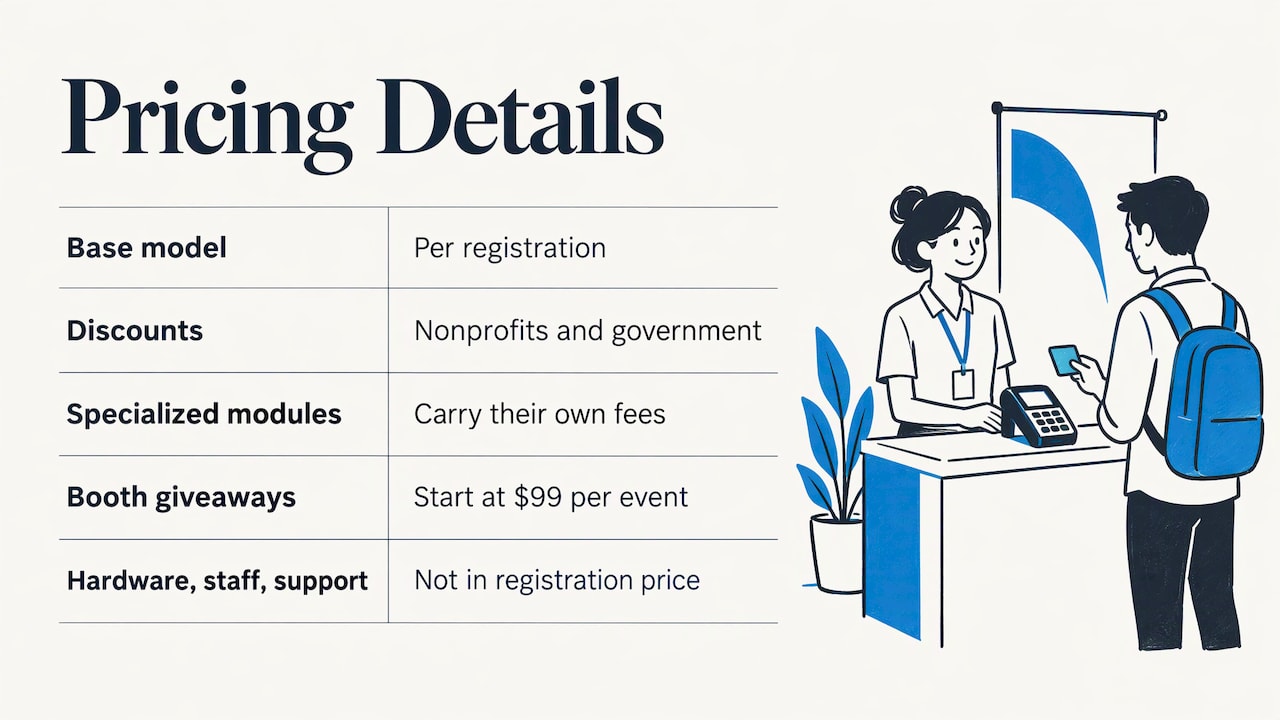
rsvpBOOK pricing is per registration, with discounted rates for nonprofits and government organizations. Specialized modules such as lead retrieval, booth giveaways, gamification, SMS messaging and QR code management carry their own fees. Standalone booth giveaway tools start at $99 per event. Badge printing and check-in kiosk hardware are optional add-on rentals, and hardware, onsite staff and support are not part of the registration price.
2. Registration depth
Can you build separate paths by registrant type? Add custom questions, discounts and group or table registration? rsvpBOOK builds branded registration sites with custom questions, registrant types, group and table registration, discounts, sessions and workshops, appointments, hotel room blocks and surveys. See the registration form options and the registration website tools.
3. Onsite operations
Check-in speed decides how your event feels in the first 30 minutes. rsvpBOOK runs QR check-in, free on any smartphone, plus Kiosk+ self check-in and custom name badges. One customer moved 2,600+ attendees through check-in with QR scanning.
4. Exhibitor and sponsor tools
Trade shows need more than attendee tickets. Look for lead retrieval, booth maps and booth sales. rsvpBOOK offers exhibitor and organizer lead retrieval and interactive booth maps with booth sales.
5. Engagement and reporting
Gamification, scavenger hunts, trivia, big-screen prize drawings and SMS reminders keep attendees moving. Custom reports and automated alerts keep you informed. All of these are part of rsvpBOOK.
6. Setup effort
Some teams want to build it themselves. Others want a partner. rsvpBOOK supports both: self-service setup, an AI-assisted builder that turns an event design document into a working setup, and hands-on implementation support when an event needs it.
Which option fits which reader
Corporate event planners. You need branded sites, custom questions and registrant types. One record from registration to reporting avoids stitching systems together.
Nonprofits. Cost matters. rsvpBOOK offers discounted rates for nonprofits, and pricing per registration keeps the model easy to explain to a board. Group and table registration suits galas.
Government and public-sector teams. Focus on compliance-friendly registration, attendance tracking and reporting. Custom reports and a single record per attendee support that work, and discounted rates apply to government organizations.
Training managers and CE providers. Sessions and workshops with CE credits let attendees choose their sessions while you track who attended what.
Trade show and association planners. Combine registration, hotel room blocks, booth maps and exhibitor lead retrieval.
Exhibitors and sponsors. Lead retrieval turns scans into a lead list. Booth giveaways, either an Instant Prize Wheel or a live Winner Drawing, turn booth visits into qualified leads. Start with the Trade Show Prize Wheel guide.
Campus recruiters and career fair hosts. Candidate capture and booth traffic are the goals. QR scanning records who stopped by, and the same giveaway tools draw students to recruiter booths.
Planning the switch
Moving from a ticketing tool is easier with a short checklist:
- List every registrant type and the questions each needs.
- Decide which sessions, workshops or appointments need capacity limits.
- Map the day-of flow: check-in, badges, sessions, exhibitor hall.
- Decide which reports leadership expects.
- Pick the engagement tools that match your goals.
A design document built from these answers is what rsvpBOOK’s AI-assisted builder turns into a working setup. If you also coordinate tasks across a team, a roundup of project management tools for event planners can help with the planning side.
For a deeper look at selection, the rsvpBOOK blog explains how to choose event management software.
What rsvpBOOK brings to the decision
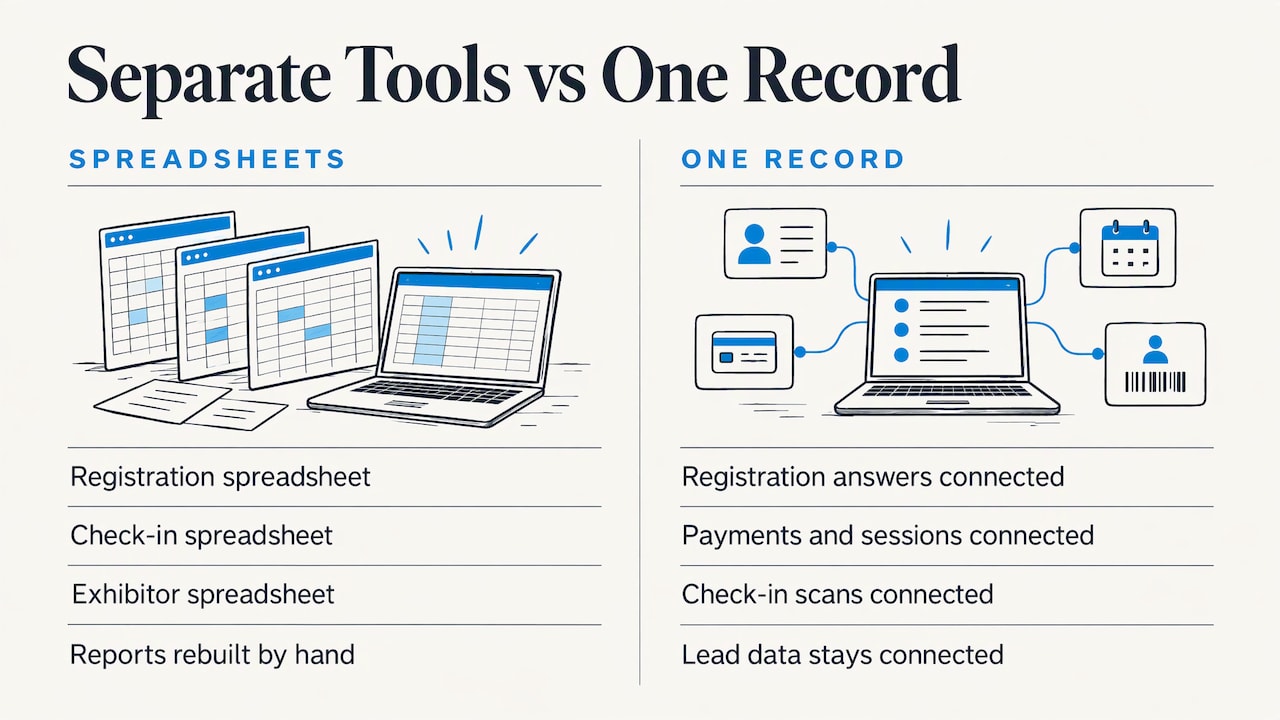
rsvpBOOK connects registration, payments, sessions, onsite operations, exhibitor programs, engagement and reporting in one record. That means one place to look when someone asks how many people registered, paid, checked in and attended a workshop.
See the full event management software overview, the features list and event ticketing for paid events.
Our view
Most organizers do not leave a ticketing tool because of the tool. They leave because the event grew. The first sign is a spreadsheet next to the registration page, then another for check-in, then another for exhibitors.
We built rsvpBOOK so those stages share one record. Registration answers, payments, session choices, check-in scans and lead data stay connected, so reports do not need to be rebuilt by hand.
We also think software should match the team. Some organizers want to configure everything themselves. Others want hands-on implementation support. We offer both, and we have supported event organizers since 2004.
Per-registration pricing, discounted rates for nonprofits and government, and free QR check-in on any smartphone are meant to keep the model simple for events of many sizes.
Droshawn
Start with the event you are running
If your event needs registration paths, sessions, check-in, badges, exhibitor lead capture or reporting, rsvpBOOK covers them in one platform. Booth giveaway tools start at $99 per event, and the pricing page lists the modules.
Badge printing and check-in kiosk hardware are optional add-on rentals. Tell us what your event looks like and we will help you map it.
FAQ
What is a good Eventbrite alternative that does more than ticketing?
rsvpBOOK is a strong option for organizers who need registration, onsite and engagement tools in one platform. It handles custom registration paths, sessions and workshops, QR check-in, badges, lead retrieval and reporting. Pricing is per registration.
Is there a free option for check-in?
Yes. rsvpBOOK’s QR check-in is free on any smartphone, so volunteers and staff can scan attendees without special scanners. Kiosk+ self check-in and badge printing hardware are optional add-on rentals.
Does rsvpBOOK offer discounts for nonprofits?
Yes. rsvpBOOK offers discounted rates for nonprofits and for government organizations. Pricing is per registration, and the team can walk you through your event during a demo.
Can I get help setting up my event?
Yes. You can set up your event yourself, use the AI-assisted builder to turn an event design document into a working setup, or ask for hands-on implementation support.
Can exhibitors capture leads at my event?
Yes. rsvpBOOK offers exhibitor and organizer lead retrieval, plus booth giveaways with an Instant Prize Wheel or live Winner Drawing, so booth visits become qualified leads.
Ready to see it with your own event? Book a demo or start building an event free.
Sources
Recommended
- Event Ticketing
- Event Registration Software for Conferences
- Event Housing & Room Block Management Software
Planning an event that doesn’t fit neatly into somebody else’s template? See how rsvpBOOK handles registration, onsite check-in, lead retrieval and engagement in one platform. Book a demo: https://www.rsvpbook.com/book-a-demo