
The best Cvent alternatives for a small or mid-size conference are platforms that price per registration, launch without a long implementation, and cover registration, payments, sessions, check-in and exhibitors in one place. rsvpBOOK is one of them. Smaller teams usually look elsewhere because of enterprise contracts, a steep learning curve, and paying for features a 300-person event never touches.
This guide compares the main types of alternatives on pricing model, setup time and what’s included. It also shows where rsvpBOOK, which has supported event organizers since 2004, fits.
TL;DR
- Smaller conferences tend to do better with per-registration pricing than with annual enterprise licenses, because cost follows attendance.
- Compare alternatives on three things first: pricing model, setup time, and what’s included in the base platform.
- Registration-only tools launch fast but often leave sessions, onsite operations and exhibitors to other systems.
- rsvpBOOK combines registration, payments, sessions, badges, QR check-in, exhibitor lead retrieval and reporting in one record, with self-service setup or hands-on implementation support.
- Nonprofits and government organizations can get discounted rates.
Table of Contents
- Why smaller teams look beyond enterprise platforms
- The main types of Cvent alternatives
- How to compare before you choose
- Where rsvpBOOK fits
- Trade shows and exhibitors
- Engagement without extra vendors
- Which option fits which conference
- Perspective
- See rsvpBOOK on your own event
- FAQ
- Sources
Why smaller teams look beyond enterprise platforms
Cvent is built for large, complex programs, and many organizers are happy with it. A conference with a few hundred or a few thousand attendees often has different needs. The same four reasons come up again and again.
- Contract structure. Annual enterprise agreements make sense for teams running dozens of events. They are harder to justify for one or two conferences a year.
- Complexity. More modules mean more screens, more settings and more training before the first registration page goes live.
- Learning curve. If the person running the event also has a day job, a long onboarding is a real cost.
- Unused features. Paying for a full suite when you need registration, sessions, check-in and a booth program means paying for capacity you won’t use.
None of this makes a larger platform wrong. It means the right fit depends on event size, staffing and how many events you run each year.
The main types of Cvent alternatives
Most options fall into a handful of categories. We describe them by type here, because what matters for your decision is how each one is priced and what it covers.
| Type of alternative | Typical pricing model | Typical setup time | What’s usually included | Best fit |
|---|---|---|---|---|
| Enterprise suites from other vendors | Annual license, often quote-based | Longer, with implementation projects | Broad: registration, apps, sponsorship, analytics | Large, multi-event programs |
| Registration-first tools | Per ticket or per registration | Fast, often self-service | Forms, payments, basic attendee lists | Simple events with few sessions |
| Ticketing marketplaces | Per-ticket fees | Very fast | Ticket sales and basic check-in | Public, consumer-style events |
| Mobile app and engagement specialists | Per event or annual | Moderate | Apps, agendas, networking | Events where the app is the priority |
| All-in-one registration and event management | Per registration, with optional modules | Fast self-service or guided setup | Registration through reporting in one record | Conferences, associations, trade shows, trainings |
Pricing models in this market vary widely. A published pricing benchmark shows annual licenses, flat yearly fees and per-ticket fees all in use. Always ask each vendor for the full cost at your expected attendance, including payment processing.
How to compare before you choose
A feature checklist alone won’t separate platforms, because most vendors tick the same boxes. These criteria do.
Pricing model
Per-registration pricing scales with your attendance. A 250-person conference pays for 250 registrations, not for a license sized for 10,000. Annual licenses can work well when you run many events. Ask for a total at your real numbers, and list which modules cost extra.
Setup time
Ask how long it takes to go from a signed agreement to a live registration page. Then ask who does the work. Some platforms are fully self-service, some need a services project, and some give you both options.
What’s included
List what your event needs in order: registration, payments, sessions, badges, check-in, exhibitors, reporting. Then check whether each item is in the base platform, an add-on, or a separate vendor. Every separate vendor is another login and another export file.
Integrations, support and scale
Buyer guides suggest judging integrations by how deeply data flows, not just whether a connector exists. The questions to ask include support hours and channels, implementation services, and how pricing behaves as your program grows. Put those questions to every vendor on your shortlist, including us.
Planning the work around the event
Software for the event itself is one layer. Your team also needs a way to track tasks and deadlines, and a roundup of event planning software tools can help you build that around your registration platform.
Where rsvpBOOK fits
rsvpBOOK is event management and registration software that connects every stage of an event in one record. It is a flexible alternative to enterprise event platforms for teams that want configuration depth without enterprise overhead.
- Pricing: rsvpBOOK pricing is per registration, not an enterprise contract. Nonprofits and government organizations get discounted rates.
- Setup: Organizers can set up an event themselves or work with our team. We offer hands-on implementation support when an event needs it. An AI-assisted builder turns an event design document into a working setup.
- What’s included: Registration, payments, sessions, onsite operations, exhibitor programs, engagement and reporting sit in one platform. Specialized modules such as lead retrieval, booth giveaways, gamification, SMS messaging and QR code management are available as add-ons.
Registration and payments
Organizers build a branded registration website with custom questions, registrant types, group and table registration, and discounts. Registration forms can follow different paths for members, guests, speakers and sponsors. Payments run through event payment management, and ticketing is available for paid sessions and add-ons. Our event registration software for conferences page covers the full setup.
Hotel room blocks
If your conference has a hotel block, room block management keeps housing tied to the registration record. You don’t need a separate spreadsheet.
Sessions, workshops and CE credits
Training managers and association planners can run sessions and workshops, including sessions with CE credits. Attendees choose what to attend during registration. Appointments cover one-on-one meetings.
Onsite check-in and badges
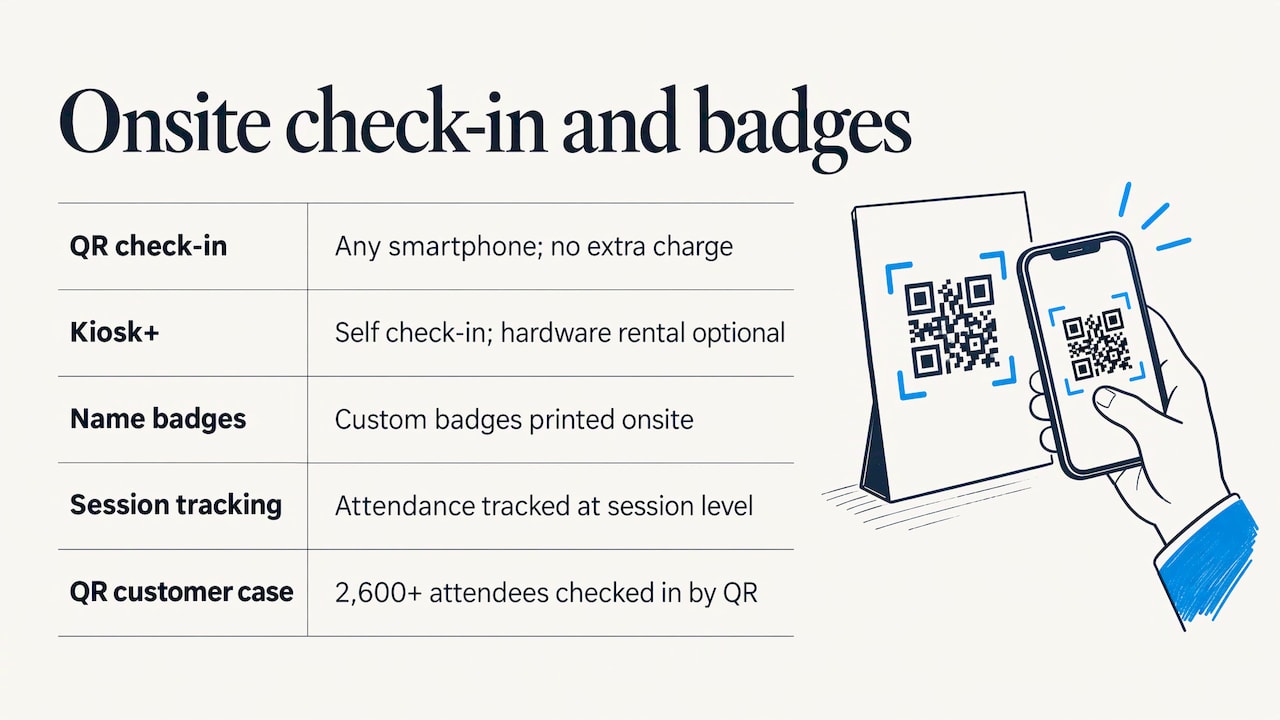
On event day, QR check-in works on any smartphone at no extra charge. Kiosk+ offers self check-in, and custom name badges can be printed onsite. Badge printing and check-in kiosk hardware are optional add-on rentals. You can add them only if your event needs them. Attendance tracking also works at the session level, which helps with workshop and CE records.
One customer moved 2,600+ attendees through check-in with QR scanning. A mobile attendee app adds personalized agendas and messaging.
Reporting and alerts
Custom reports and automatic event alerts show what’s happening without manual exports. Because everything lives in one record, registration numbers, payments and attendance come from the same source.
Trade shows and exhibitors
Exhibitors are where many registration-only tools stop. rsvpBOOK handles this side of the event directly.
- Lead retrieval. Exhibitors and organizers can capture leads by scanning attendees. See lead retrieval.
- Interactive booth maps. Maps support booth sales, so exhibitors can pick and buy space online.
- Booth giveaways. An Instant Prize Wheel or a live Winner Drawing turns booth visits into qualified leads. Standalone booth giveaway tools start at $99 per event. Details are on the trade show prize wheel page.
These tools suit trade shows and also career fairs. Recruiting teams use the same giveaway tools to build booth traffic and capture candidate details.
Engagement without extra vendors
Engagement features such as gamification, scavenger hunts, trivia, big-screen prize drawings and SMS reminders can run from the same platform. That keeps participation data in the attendee record. It can also help sponsors see which activities brought people to their booths.
Which option fits which conference
- A 200-person association meeting with one hotel block: an all-in-one platform with per-registration pricing and room block management.
- A free, public community event: a ticketing marketplace may be enough.
- A multi-day trade show with exhibitors: a platform with lead retrieval, booth maps and giveaways in the base ecosystem.
- A training series with CE credits: session-level tracking and attendance records matter more than a flashy app.
- A global program with dozens of events a year: an enterprise suite may still be the better fit, so compare it fairly against the others.
Perspective
Most small and mid-size conference teams don’t struggle because the software lacks features. They struggle because the pieces don’t talk to each other. Registration lives in one tool, badges in another, exhibitor scans in a third, and the final report is rebuilt by hand.
That’s why we built rsvpBOOK around one record. When a registrant pays, picks a workshop, checks in by QR code and visits a booth, it all lands in the same place. Reports and alerts then work from live data.
We also think the buying model matters. Per-registration pricing lets an event pay in proportion to its size. Self-service setup works for teams that like to build, and hands-on implementation support is there when an event is complex or the timeline is tight.
If you’re weighing alternatives, put your real event on the table: your attendance, your sessions, your exhibitors. Then see which platform handles all of it without extra systems.
Droshawn
See rsvpBOOK on your own event
rsvpBOOK handles registration, payments, sessions, badges, QR check-in, exhibitor lead retrieval and reporting in one platform. Pricing is per registration, with discounted rates for nonprofits and government. Our team can help with setup when you want it. See the full event management software overview.
For booth giveaways, gamification and SMS messaging, see the add-on module options.
FAQ
Why do small and mid-size conferences look for Cvent alternatives?
The common reasons are enterprise contracts, complexity, a long learning curve and paying for features the event doesn’t use. Smaller teams usually want a platform that matches their size and staffing. Many prefer pricing that scales with attendance.
How should I compare Cvent alternatives?
Start with pricing model, setup time and what’s included in the base platform. Then check support, integrations and how the cost changes as you grow. Ask each vendor to quote your actual attendance and list every add-on.
Does rsvpBOOK charge per registration?
Yes. rsvpBOOK pricing is per registration, and nonprofits and government organizations receive discounted rates. Booth giveaway tools can also be bought on their own, starting at $99 per event. Other modules, such as lead retrieval, gamification, SMS messaging and QR code management, are priced separately.
Does rsvpBOOK support badge printing and kiosks?
Yes. It supports custom name badges and Kiosk+ self check-in. Badge printing and kiosk hardware are optional add-on rentals. QR check-in works on any smartphone for free.
Can rsvpBOOK help me set up my event?
Yes. You can build the event yourself, use the AI-assisted builder to turn a design document into a working setup, or ask for hands-on implementation support. Pick whichever suits your timeline and team.
Sources
- Event Matchmaking Software Pricing 2026: Models, Fees
- How to Choose the Right Event Management Platform: A Buyer’s Guide
Ready to see it on your event? Book a demo or start building an event free.
Recommended
- Event Management Software for Conferences & Events
- Sessions and Workshops
- Event and Workshop Attendance Tracking
- Online Event Registration Website Management
Planning an event that doesn’t fit neatly into somebody else’s template? See how rsvpBOOK handles registration, onsite check-in, lead retrieval and engagement in one platform. Book a demo: https://www.rsvpbook.com/book-a-demo